

The willful neglect trap: End-of-life software and MSP liability


Why EOL software and high-CVSS vulnerabilities are your biggest legal risks
During a recent risk assessment for a regulated nonprofit healthcare organization, I asked its MSP whether the network contained any unsupported software. The answer was an emphatic “No.” I then reviewed the organization’s cyber insurance application. I found that the MSP had instructed the CFO to answer “No” to the same question.
Then we scanned the network and found the ugly truth.
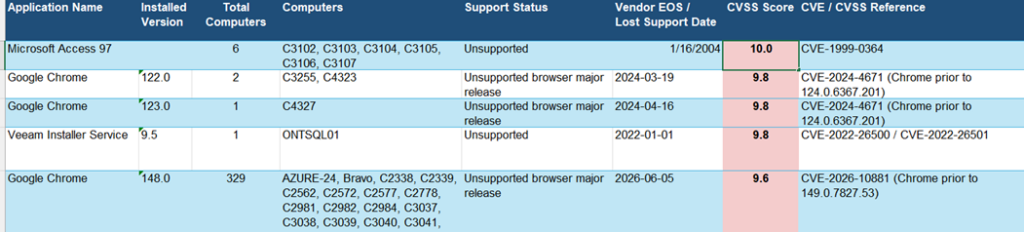
There were hundreds of application programs and utilities that were in the High and Critical ranges of the Common Vulnerability Scoring System (CVSS). This includes Microsoft Access 97, that went End-of-Life (EOL) in January 2004—22 years ago! Access 97 has the highest risk score on the CVSS scale, a Critical flaw that represents an existential threat to an organization’s network perimeter or internal data.
The nonprofit was exposed to known vulnerabilities that could not be patched, regulatory penalties, negligence lawsuit losses, and the high likelihood that a cyber insurance claim for millions of dollars would be immediately denied—and for good reason.
I looked at the MSP’s website, where they brag about how fast they install critical patches. The client shared their contract with the MSP. The MSP said they deliver HIPAA-compliant services and included a HIPAA Business Associate Agreement. That left the MSP open to its own Errors and Omissions (E&O) insurance deny a claim if the client sued. Making false promises is fraudulent, an exclusion in E&O insurance policies. The limits of liability in the MSP’s Master Service Agreement (MSA) could be declared meaningless because willful neglect and professional negligence mean you cannot protect yourself with a contract.
EOL software is like cancer. Your client may not feel any pain until it is too late. Scanning tools are like X-rays and MRIs, which can provide early warnings. The MSP had access to the same scanning tools we use and could have easily mitigated the problem.
For years, MSPs have treated patch management as a routine, operational box to check. You deploy your RMM tool, approve updates on Patch Tuesday and tell your clients they are secure. However, in the modern regulatory and legal landscape, that approach to software vulnerabilities is dangerously outdated. Today, unpatched systems and EOL applications are no longer just technical hurdles. They are massive legal liabilities that can destroy an MSP during post-breach litigation.
When a cybersecurity incident lands an SMB in court or triggers a regulatory audit, the legal discovery process shifts away from what tools you had installed and focuses entirely on what you knew and when you knew it. Continuing to run EOL software, or ignoring vulnerabilities with a CVSS score of 7 or higher, can cross the line. It becomes “willful neglect” and failure to meet your professional “duty of care” because you are the client’s IT expert.
The legal anatomy of “willful neglect” and “duty of care”
In legal proceedings and compliance audits, “willful neglect” means an intentional failure or conscious indifference to fulfill a regulatory obligation. This includes those under HIPAA, FTC Safeguards or GLBA. A professional duty of care is a legal and ethical obligation to exercise reasonable caution, skill and diligence to protect clients or the public from foreseeable harm. It forms the foundation of malpractice and negligence law. Breaching your duty can result in severe legal, financial and regulatory penalties. From an expert perspective, attorneys look for provable technical negligence to shift liability from the business owner to the MSP. Two specific categories make their job incredibly easy:
- EOL software: Operating systems, applications or those difficult-to-understand utilities do not receive security patches when not supported by the manufacturer. This includes, Microsoft .Net Runtime and Visual C++ 2005 Redistributable. Running EOL software means knowingly operating a system with unpatchable, publicly exposed vulnerabilities. In a courtroom, this is leaving the front door wide open—failing to meet your duty of care.
- High-CVSS vulnerabilities (7.0+): The CVSS provides a standardized way to rate the severity of a vulnerability from 0.0 to 10.0. Any flaw rated 7.0 or above is classified as High or Critical. This means it is easily exploitable, often remotely, and requires minimal user interaction. If reports show vulnerable software classified above 7.0 that remains unaddressed for months, you’ve documented knowledge of an active threat.
Our client’s MSP simply wasn’t looking at these sections of the reports his monitoring tools were providing.
The hidden crisis: The cyber insurance claim denial
Clients rely on their cyber insurance policies to absorb the financial shock of a breach. However, insurance carriers have grown highly sophisticated. Attestation forms now explicitly ask if the organization enforces lifecycle management and patches critical vulnerabilities within a strict timeframe. MSPs get in trouble when their client asks for help completing their insurance application and assume their services are performed. MSPs often answer based on the systems they manage, instead of the line-of-business software and cloud services the client uses.
If a client suffers a ransomware attack because of an unpatched CVSS High or Critical vulnerability or a legacy Windows server, the insurance carrier will perform a forensic analysis. If they discover the technical reality contradicts the application forms, they will deny the claim based on misrepresentation. When the client holds a million-dollar recovery bill, they sue the MSP for failing to protect them from the risk. Ntirety and Lantech are two MSPs that found this out the hard way.
Operational framework for lifecycle and vulnerability management
To protect your clients and your MSP, you must transition from reactive patching to an active, documented vulnerability management program.
This is even more important with nation-state bad actors using AI tools to identify and attack vulnerabilities faster than ever.
The target moves quickly because software and devices, like firewalls, go end-of-life on random schedules. What is supported today may be unsupported tomorrow. Vendors publish EOL schedules for their products. You can easily find upcoming EOL dates and implement replacement programs before danger hits.
For our risk analysis I used AI to identify EOL software and ranking it based on CVSS scores.
First, we used a basic network scanning tool to identify the operating systems, software applications and utilities in the environment.
I fed the list into an AI tool and prompted it to identify unsupported EOL versions. Then I asked to rank them by CVSS score, so the highest risks can be addressed first.
Regulatory analysis: EOL software bans
Across regulatory and cybersecurity frameworks, including CIS controls and the NIST Cybersecurity Framework (CSF), the mandate to eliminate or heavily mitigate EOL and unsupported software is in the legal and technical definition of risk management.
This is the headline announcing the federal HIPAA enforcement agency’s penalty against Anchorage Community Mental Health Services.
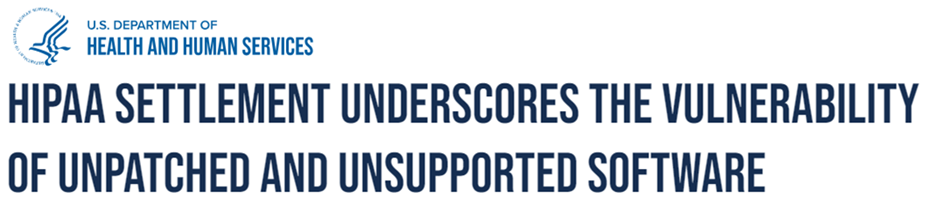
In its $240,000 settlement with Providence Medical Institute, the federal HIPAA enforcement agency cited “unsupported and obsolete operating systems to host its ePHI data.”
CMMC & NIST SP 800-171
Because CMMC is built on the NIST SP 800-171 framework, removal or containment of unsupported software is a core requirement. This is to protect Controlled Unclassified Information (CUI).
- NIST SP 800-171 / CMMC Level 2 – Control 3.14.1 (Flaw remediation): Requires organizations to identify, report and correct information system flaws in a timely manner. Running EOL Software natively violates control because a developer cannot correct it using patches.
- System and Information Integrity (SI) requirements: CMMC Level 2 strictly mandates the removal of unsupported or end-of-life systems from environments processing CUI. If an EOL asset must remain for legacy purposes, it requires an approved Plan of Action and Milestones (POA&M). It can also use strict compensating controls (such as total network isolation).
The FTC Safeguards Rule (Gramm-Leach-Bliley Act)
Updated with strict technical mandates, the FTC Safeguards Rule applies to non-banking financial institutions. This includes mortgage brokers, motor vehicle dealers, payday lenders and tax preparers.
- Section 314.4(c)(5) – Application Security and Patch Management: This section explicitly requires covered institutions to establish procedures for regularly reviewing the security of all applications and applying patches.
- The EOL directive: Regulatory guidelines explicitly dictate that financial institutions must dispose of or replace all applications that are EOL or no longer supported by the application vendor, as they fail to meet the requirement for continuous risk mitigation.
HIPAA
While the text of the HIPAA Security Rule does not use the modern phrase “End-of-Life software,” the Department of Health and Human Services (HHS) and administrative law judges heavily penalize the use of unpatched legacy systems under core administrative and technical safeguards.
- 45 CFR § 164.308(a)(1)(ii)(A) – Risk Analysis: Requires a continuous assessment of potential risks and vulnerabilities to the confidentiality, integrity and availability of ePHI. Running software with known, unpatchable vulnerabilities (CVSS 7+) is legally interpreted as a failure to conduct a compliant risk analysis.
- 45 CFR § 164.308(a)(5)(ii)(B) – Protection from Malicious Software: Mandates procedures for guarding against, detecting and reporting malicious software. Security guidelines from HHS state that running unsupported operating systems (like Windows 10 or older Server editions) prevents compliance with this standard because the system lacks baseline defense capabilities against modern malware.
NYS DFS 500 (New York Department of Financial Services)
As one of the strictest state-level financial cybersecurity regulations in the U.S., NYS DFS Part 500 sets an aggressive baseline for banking, insurance and financial services operating in New York—even if they do not have any physical presence in NY.
- Section 500.08 – Asset Management and Device Vulnerability: Covered entities must maintain a definitive asset inventory that tracks the lifecycle of all hardware and software.
- Section 500.14 – Training and Monitoring / Vulnerability Management: This section mandates regular vulnerability assessments and rapid patch remediation. NYS DFS auditors view operating non-supported, unpatchable systems as an active failure of the CISO’s governance mandate. requiring formal risk-acceptance tracking and network segmentation if the software cannot be removed immediately.
NAIC Insurance Data Security Model Law
Adopted by dozens of states to govern the insurance sector, the National Association of Insurance Commissioners (NAIC) model law heavily mirrors federal standards.
- Section 4 – Information Security Program: Mandates that insurance licensees regularly assess the sufficiency of safeguards in place to control recognized threats.
- Patch and Environment Lifecycle Control: Under the risk management provisions, licensees must implement a regular patch management schedule and actively phase out components that are no longer supported by developer security updates, preventing unmitigated software vulnerabilities from endangering policyholder data.
State Privacy and Consumer Protection Laws (California CCPA/CPRA, NY SHIELD Act)
State laws generally enforce data protection by penalizing companies that fail to maintain “reasonable security procedures.”
- New York SHIELD Act: Broadens the definition of data breaches and mandates that any business holding NY residents’ private info must deploy reasonable technical safeguards. The act specifically lists regular software patching and modification as a core standard. Leaving an EOL system connected to data environments constitutes a direct failure of “reasonable” maintenance.
- California Consumer Privacy Act (CCPA/CPRA): Grants consumers the right to sue businesses following a data breach if the business failed to maintain reasonable security practices. Plaintiffs routinely use the presence of EOL software or unpatched vulnerabilities rated CVSS 7.0 or higher as definitive proof of negligence to win statutory damages.
Turning legal liability into high-margin revenue
Many MSPs hesitate to tell clients they need to replace a $10,000 line-of-business application or upgrade legacy servers because they fear pushback. However, framing this through the lens of regulatory, legal and insurance liability entirely changes the conversation.
Business owners and CFOs always think things are expensive. If you show them that the expense will avoid a $3 million to $5 million insurance claim denial, they can easily see the benefits of investing to avoid risk.
By introducing a formal Vulnerability & Lifecycle Audit as a standard compliance layer, you achieve two major business goals:
1. You build a complete paper trail: If a client explicitly refuses to upgrade an EOL application or fund the remediation of high-CVSS flaws, you can document that refusal and show that you were not negligent. A formal, signed “Risk Acceptance Form” shifts the legal liability away from your MSP and firmly onto the client’s shoulders. Even without a signed form, you can document your actions to make the client aware of their risks.
2. You drive project revenue: When business owners realize that keeping an outdated application prevents them from passing a regulatory audit or invalidates their insurance policy, the upgrade ceases to be an optional “IT expense.” It becomes a mandatory business survival requirement, allowing you to scope and bill for lucrative migration projects.
What if your client needs to keep using unsupported software?
One of our healthcare clients needed to keep an old Windows 2003 server alive because they had changed Electronic Health Record software. They needed to retain their old records to comply with Medicare and state record retention laws.
We advised them to create an ‘island’ by disconnecting the server from their network and using a small network switch to create an isolated mini network with just the server, a PC to access records, and a printer.
When their cyber insurance application asked if they were using unsupported software, they answered YES. They included a description of how they isolated the old server and its risks from the rest of the network. The insurance carrier issued the policy based on the compensating controls.
Conclusion: Control the narrative before the incident
In a courtroom, numbers and documentation rule. If you cannot produce an active inventory of your clients’ EOL software and how you managed CVSS vulnerabilities, you’re exposed. By implementing a strict operational framework for tracking software lifecycles and forcing clients to sign off on accepted risks, you secure their infrastructure while bulletproofing your MSP against litigation.
Mike Semel’s Compliance Mastery for MSPs training system includes a reference tool. It quickly identifying the compliance requirements for multiple industries. Included are sales guides and a full masterclass on using risk-based selling to quickly close deals with regulated clients. Share it with 10 workforce members.

Power Your MSP Success with the Kaseya Community
Get fast answers, share product ideas, access exclusive resources, stay current on Kaseya product innovations, and connect with MSP peers.
2026 Kaseya State of the MSP Report
Get 2026 MSP insights from 1,000 plus providers and learn how to grow revenue, adapt to market pressure, and stay competitive.

Get More MSP Insights
Join 50,000+ MSP professionals receiving expert insights, best practices, and industry trends.